Case study
MA-nexusmail Automation System
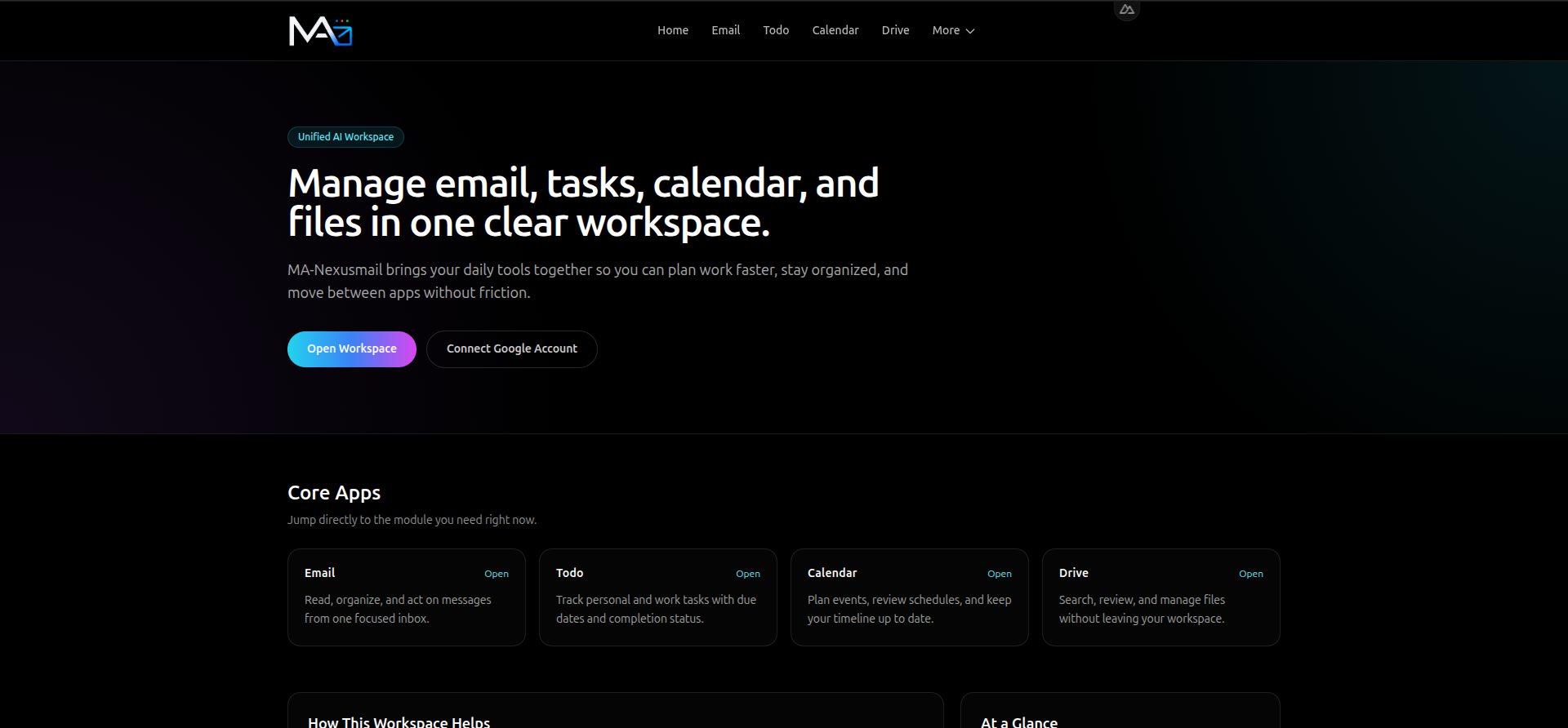
An AI-powered productivity automation platform that connects Gmail, Google Calendar, Google Drive, and task workflows to reduce repetitive work and centralize everyday operations.
- Backend & APIs
- Automation
- Full Stack
- ai
Notable impact
- Unified email ingestion, AI-powered summarization, calendar synchronization, Drive file management, and task-to-calendar automation.
- Implemented incremental synchronization, deduplication, and conflict detection to improve data consistency across workflows.
- Introduced queue-based AI processing to handle summarization outside the main request-response path.
- Automated repetitive productivity tasks across multiple Google services through integrated workflows.
- Implemented OAuth session handling, JWT, and AES encryption as part of the system's authentication and data-protection architecture.
Overview
Managing emails, calendar events, files, and personal tasks across multiple applications can create unnecessary context switching and repetitive work.
MA-nexusmail was built to connect these separate productivity workflows into one automated system. The platform integrates Gmail, Google Calendar, Google Drive, task management, and AI-powered summarization to help streamline everyday information management.
As the backend-focused full-stack developer, I designed and implemented the automation pipelines, API integrations, synchronization logic, and AI processing workflows that connect these services.
Rather than treating each integration as an isolated feature, the project focuses on making them work together through a modular monolith architecture, with particular attention to data consistency, processing efficiency, and reliable background operations.
The Challenge
Productivity tools each serve a different purpose, but coordinating information between them can require repeated manual actions.
Emails need to be reviewed and summarized. Calendar information needs to stay synchronized. Files and their metadata need to be organized. Tasks may also need to become calendar events to support better planning.
Building these capabilities introduces additional engineering challenges:
- Data duplication: Repeated synchronization can create duplicate records if incoming data is not tracked properly.
- Conflicting updates: Information may change between synchronization cycles, requiring conflict detection and consistent update handling.
- AI processing overhead: Summarization can take longer than ordinary API requests and should not unnecessarily delay user-facing operations.
- Multiple service integrations: Each Google service has its own API behavior, authentication requirements, and data structures.
- Authentication and data protection: Connected services and application data require appropriate session handling and protection mechanisms.
The goal was to build an integrated automation platform that addresses these concerns without fragmenting the application into multiple independently deployed services.
The Solution
I developed a productivity platform that connects Google services and AI processing through coordinated backend workflows.
Productivity automation
- Gmail ingestion: Retrieves email information and brings it into the application's processing pipeline.
- AI-powered email summarization: Uses the OpenAI API to generate summaries that make email content easier to review.
- Google Calendar synchronization: Connects calendar information to the broader productivity workflow.
- Google Drive integration: Supports file management and metadata extraction for organized access to file information.
- Todo-to-Calendar automation: Connects task workflows with calendar scheduling to reduce repetitive manual updates.
- Scheduled processing: Uses cron jobs and automated workflows to support recurring operations.
Data reliability
- Incremental synchronization: Processes changes instead of unnecessarily reprocessing all available data during every synchronization cycle.
- Deduplication: Identifies repeated records to help prevent duplicate data from accumulating.
- Conflict detection: Detects conflicting updates during synchronization to support more consistent data handling.
- Queue-based AI processing: Separates longer-running summarization work from the main request-response path.
Authentication and data protection
- Google OAuth: Supports authentication and integration with Google services.
- JWT: Supports token-based application session handling.
- AES encryption: Provides an encryption mechanism for data that requires protection.
Architecture & Engineering Decisions
The central engineering challenge was not simply connecting APIs. It was coordinating multiple services and background operations while keeping the system maintainable and predictable.
Modular monolith architecture
The application uses a modular monolith to keep related workflows within one deployable system while separating responsibilities into logical modules.
This approach allows email processing, calendar synchronization, Drive operations, AI summarization, and task automation to share application infrastructure without mixing their responsibilities into one large, tightly coupled implementation.
Incremental synchronization
Rather than repeatedly processing the same information, the synchronization pipeline is designed to focus on relevant changes.
Combined with deduplication and conflict detection, this helps limit redundant processing and makes cross-service data handling more manageable.
Background AI processing
AI summarization can involve longer processing times than typical application requests.
I incorporated queue-based processing to separate these workloads from the main request-response path. This allows AI-related tasks to be handled as background work rather than requiring every operation to wait for summarization to finish.
Integrated API workflows
The backend connects Google APIs and the OpenAI API through coordinated application workflows. REST API endpoints provide application access, while scheduled jobs support recurring automation.
The resulting architecture brings multiple integrations together while maintaining distinct responsibilities across the system.
Results & Technical Impact
MA-nexusmail demonstrates how backend engineering and AI integration can transform disconnected productivity operations into coordinated workflows.
- Less repetitive manual work: Email processing, summarization, synchronization, file metadata handling, and task-to-calendar operations are connected through automation.
- Centralized productivity workflows: Multiple Google services are integrated into a common application rather than being treated as entirely separate workflows.
- More controlled synchronization: Incremental processing, deduplication, and conflict detection address common data-management challenges.
- Separated AI workloads: Queue-based summarization helps prevent longer-running AI tasks from blocking the primary request-response path.
- Structured backend architecture: The modular monolith organizes multiple integrations and automation pipelines within a maintainable application.
- Authentication and encryption mechanisms: OAuth, JWT, and AES encryption form part of the application's approach to authentication and data protection.
Why This Project Matters
AI automation becomes more useful when it is connected to the systems people already use.
MA-nexusmail demonstrates my ability to go beyond basic API integration by building coordinated automation pipelines, background processing, synchronization mechanisms, and AI-powered workflows within a single application.
The project combines full-stack development with practical AI engineering and backend architecture. Its focus is not simply to add AI to an application, but to integrate intelligent processing into everyday operations while accounting for data consistency, processing efficiency, and maintainability.
The engineering objective: turn repetitive, disconnected productivity tasks into coordinated workflows that require less manual intervention.